Good post on SharePoint site optimization:
Chris O’Brien’s blog: My checklist for optimizing SharePoint sites
Good post on SharePoint site optimization:
Chris O’Brien’s blog: My checklist for optimizing SharePoint sites
My new column – If I had Workflow Foundation, would I have finished this column on time? – is up on Legal IT Professionals
I just read a job ad for a CTO that listed the following as a requirement for the position:
“Must be committed to offering excellence to God in all you do”
I am not sure, but isn’t it illegal to discriminate based on religion when hiring?
The next post in this series will be coming soon, I hope – maybe the end of April.
UPDATE: Still working on this – billable work is getting in the way 🙂 I am also working on doing the next one as a webcast rather than a long text tutorial. I am curious, what do you think is the best approach to this, text or video?
CANOE – Lifewise Sex & Romance – Lovewise: 7 reasons to date a geek
Noticed this title when I was browsing around the Canoe.ca web site (I have no idea why I go there – every time I do I find something that offends me), and I had to look at it.
Am I the only person in the world who sees why this is grotesquely offensive? I mean, would they post and article on “7 reasons to date a cripple”?, or “7 reasons to date a black guy”?, or “7 reasons to date a bimbo”?
Hardly.
(well, CANOE might)
Other terms used in this article:
Also mentioned is that you may never need to call tech support again, and that “dating a geek is a safe bet because the nerd needs you more than you need the nerd”
When will people see that terminology such as “geek” and “nerd”, and the idea of dating someone because you can use them and control them, is offensive and not acceptable? And that these attitudes are a big part of the reason why many kids in our culture do NOT go into scientific and technical fields.
(note that I am consciously using offensive terms above to make the point).







<?xml version="1.0" encoding="utf-8" ?>

<!-- Customize the text in square brackets.
     Remove brackets when filling in, e.g.
     Name="[NAME]" ==> Name="MyWorkflow"
 -->

<Elements xmlns="http://schemas.microsoft.com/sharepoint/">
   <Workflow Name="MyWorkflow"
             Description="My SharePoint Workflow"
             Id="0d94af3a-45e7-4035-b351-9a10fc41018d"
             CodeBesideClass="MyWorkflow.Workflow1"
             CodeBesideAssembly="MyWorkflow, Version=1.0.0.0, Culture=neutral, PublicKeyToken=96c40524715e44e9">

      <Categories/>
      <MetaData>
         <!-- Tags to specify InfoPath forms for the workflow; delete tags for forms that you do not have -->
         <!--<Association_FormURN>[URN FOR ASSOCIATION FORM]</Association_FormURN>
         <Instantiation_FormURN>[URN FOR INSTANTIATION FORM]</Instantiation_FormURN>
         <Task0_FormURN>[URN FOR TASK (type 0) FORM]</Task0_FormURN>
         <Task1_FormURN>[URN FOR TASK (type 1) FORM]</Task1_FormURN>-->
         <!-- Modification forms: create a unique guid for each modification form -->
         <!--
         <Modification_[UNIQUE GUID]_FormURN>[URN FOR MODIFICATION FORM]</Modification_[UNIQUE GUID]_FormURN>
         <Modification_[UNIQUE GUID]_Name>[NAME OF MODIFICATION TO BE DISPLAYED AS A LINK ON WORKFLOW STATUS PAGE</Modification_[UNIQUE GUID]_Name>
         -->
         <StatusPageUrl>_layouts/WrkStat.aspx</StatusPageUrl>
      </MetaData>
   </Workflow>
</Elements>
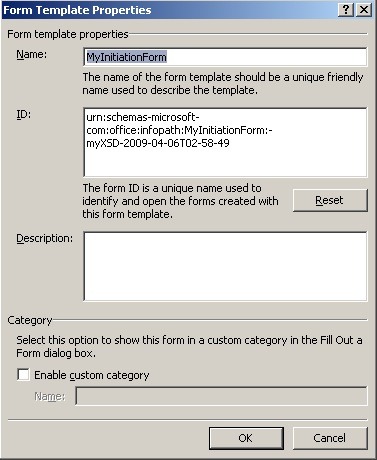
<Instantiation_FormURN>urn:schemas-microsoft-com:office:infopath:MyInitiationForm:-myXSD-2009-04-06T02-58-49</Instantiation_FormURN>
InstantiationUrl="_layouts/IniWrkflIP.aspx">
<?xml version="1.0" encoding="utf-8" ?>
<!-- Customize the text in square brackets.
     Remove brackets when filling in, e.g.
     Name="[NAME]" ==> Name="MyWorkflow"
-->
<Elements xmlns="http://schemas.microsoft.com/sharepoint/">
   <Workflow Name="MyWorkflow"
             Description="My SharePoint Workflow"
             Id="0d94af3a-45e7-4035-b351-9a10fc41018d"
             CodeBesideClass="MyWorkflow.Workflow1"
             CodeBesideAssembly="MyWorkflow, Version=1.0.0.0, Culture=neutral, PublicKeyToken=96c40524715e44e9"
             InstantiationUrl="_layouts/IniWrkflIP.aspx">
      <Categories/>
      <MetaData>
         <!-- Tags to specify InfoPath forms for the workflow; delete tags for forms that you do not have -->
         <Instantiation_FormURN>urn:schemas-microsoft-com:office:infopath:MyInitiationForm:-myXSD-2009-04-06T02-58-49</Instantiation_FormURN>
         <StatusPageUrl>_layouts/WrkStat.aspx</StatusPageUrl>
      </MetaData>
   </Workflow>
</Elements>
<?xml version="1.0" encoding="utf-8" ?>
<Feature Id="15fdd97f-db32-44c1-96cc-cab49acecd36"
         Title="MyWorkflow feature"
         Description="My SharePoint Workflow Feature"
         Version="12.0.0.0"
         Scope="Site"
         ReceiverAssembly="Microsoft.Office.Workflow.Feature, Version=12.0.0.0, Culture=neutral, PublicKeyToken=71e9bce111e9429c"
         ReceiverClass="Microsoft.Office.Workflow.Feature.WorkflowFeatureReceiver"
         xmlns="http://schemas.microsoft.com/sharepoint/">
   <ElementManifests>
      <ElementManifest Location="workflow.xml" />
   </ElementManifests>
   <Properties>
      <Property Key="GloballyAvailable" Value="true" />
      <!-- Value for RegisterForms key indicates the path to the forms relative to feature file location -->
      <!-- if you don't have forms, use *.xsn -->
      <Property Key="RegisterForms" Value="*.xsn" />
   </Properties>
</Feature>
<ElementManifests>
   <ElementManifest Location="workflow.xml" />
   <ElementFile Location="MyInitiationForm.xsn"/>
</ElementManifests>


public String HistoryDescription;
private void logToHistoryListActivity1_MethodInvoking(object sender, EventArgs e)
{
      String MySettingValue = workflowProperties.InitiationData;
      HistoryDescription = "Initiation String Entered: " + MySettingValue;
}

Just an update – I will be posting the Custom Intiation Form example soon (hopefully this weekend).
Screenshots take forever! (or I am just not very good at it)
As almost everyone probably knows, President Obama appeared on The Tonight Show last week. Many people seem to have thought this was a bad idea right from the start, but I do not see anything wrong with it. Then we (in Canada) have seen our leaders (yeah, well, sort of) appear on shows such as Royal Canadian Air Farce before, and nothing too seriously bad came out of it.
President Obama made a bit of a faux pas when he compared his bowling to being in the Special Olympics. The crowd seemed to be amused, and not terribly offended. I thought it was a funny if not-well-thought-through quip, and was not particularly offended by it – then I am not handicapped/special/differently-abled.
Or am I?
This is not a very PC thing to say, I know. The fact is, I am and have been differently-abled for most of my life. I have always been a good deal smarter than most of the people around me. This is not bragging or conceit, it is just a fact. I grew up reading encyclopaedias, doing math, physics, and astronomy, and reading philosophy – all just because I wanted to and because I found it fun. So, that made me differently-abled than most of those around me. It also meant that I had a great deal of trouble fitting in socially. I was teased, I was bullied. I was beaten up. I was avoided. I was a geek, a dork, a dweeb, a nerd. And those are the names my friends called me.
My troubles may not have been the same as someone normally covered by the term differently-abled, but there are definite problems associated.
It has become very politically incorrect to make fun of someone who is mentally challenged, or has a physical disability, or is short, or is female, or is overweight, or comes from a different ethnic background. The funny (or not so funny) thing is that it still seems to be perfectly acceptable to make fun of people who are smart, who love to learn, who love science and philosophy, and who have a hard time interacting with “normals” simply because we do not think the same way.
How many shows have been on the air (from that show with Steve Urkel to Revenge of the Nerds to Big Bang Theory) that are based almost entirely upon ridiculing this segment of the population? If Steve Urkel had been mentally challenged, would the premise of this show have been deemed acceptable? Of course not. If he had been in a wheel chair? No. Then why is it acceptable to make fun of him because he is smart but socially challenged.
This may seem petty, but take it from some one who has lived through it. It is serious. And not just for the individual. It colours the way our society sees and values people. It drives one of the problems facing our society, which is the low value we place on scientists, researchers, and educators. It influences smart young people to hide from who they are for fear of ridicule and not fitting in. It causes young people who might have an interest or talent in scientific and technical fields to be pushed away from these fields at an early age.
It no longer really offends me. Almost nothing offends me anymore, as I have developed a pretty thick skin, and I am too much an egomaniac to really care what anyone else thinks (just kidding!). But think about it the next time you watch TV, or a movie, or read something – notice how deeply engrained this is, and think about what it means in our society.
The economy is in trouble – or at least it seems to be. This is hardly a shocking statement for anyone who has not been under a rock for the last year. I sit and I wonder (as I am sure many people do) just how we ended up where we are. I am not an economist or politician or any of the people who are presumed to have an understanding of the dynamics of national and global economies. I am just a poor dumb physicist/mathematician/software developer/business person, making a few observations.
1) Is the state of our economy driven largely by media? I have noticed during my lifetime that at all times, there are certain people in the press, on TV, publishing books, etc. with “end of the world” stories about the coming economic crises. It seems to me that at certain points, mass media starts giving these doomsayers much more attention than they deserve, and further that a year or so after that happens, our economy tanks. I wonder at times if it is not at least partially a self-fulfilling prophecy – if the mass media tells us for long enough that things are bad, then our resultant behaviours cause things to get bad.
It is kind of like a (not serious) theory I have about airplanes. What if heavier-than-air flight is really impossible? Maybe airplanes really only work because the people on board believe that they work? At any given time, there will be some people who do not believe, but as long as enough believe, the everything is great. But what happens when suddenly a critical number of people on the plane start thinking “Hey, this can’t work”? Poof, the plane crashes.
Maybe the economy is something like that.
2) Big banks, Wall Street, rich people, major corporations. Everybody’s favourite targets. Have they done a lot to contribute to the current problems? Of course. Are they and they alone to blame? Hardly. Our economy got where it is because pretty much everyone involved drove it here. The real estate industry predicated on constantly rising home prices. The mortgage bankers finding new and creative ways to allow people to afford the ridiculously expensive houses they really could not afford. Consumers expecting that they should be able to afford these houses. Consumers digging themselves huge debt loads buying things they could not afford. You. Me. Everybody. We are in this mess because we all created it. Maybe to greater or lesser extents, but we all played along (except maybe for the segment of the population who never had the opportunity to play, because they have been in an economic crisis the whole time.)
People are talking a lot about this psychology of entitlement, mostly referring to executives at banks and on Wall Street. I think the problem goes much deeper than that. Our whole society has a feeling of entitlement. We work hard, so we deserve that bigger house, that newer car, that big vacation – who cares if the numbers don’t work out, we deserve it, dammit. It is the whole “American Dream” (or in my case, “Canadian Dream”) concept. It is just that, however. Just because you have worked hard and you deserve it, does not mean it will happen.
3) Values. Not religious or moral values, but the values we place on things. Who are the highest paid people in our society? Corporate wheelers and dealers. Professional athletes. Movie stars. TV stars. Musicians – at least the popular ones. I know and understand the economics of why these individuals are paid such ridiculously huge amounts of money relative to their contribution to society. I understand that what they get paid is an investment by someone, and they get huge amounts because those paying them expect to get much, much greater amounts in return for their investment. The athlete gets huge sums of money because he/she puts butts in seats at stadiums, and sells merchandise.
The problem is with the people who buy into this crap. The people who pay silly amounts just to see a sports game, or a movie, or a concert. The societal value system that says these people are worth paying to see.
It is also silly that in our society, these people are valued at such a level, when the people who really have the power to solve the worlds problems – researchers in science and engineering and medicine and throughout our universities have to fight tooth and nail to get enough money just to keep the research going. Not to mention the value we place on our educators and the infrastructure around them. Education and fundamental research should be getting the big pay checks, not people playing games, playing make-believe on a movie screen, or pumping out music.
This inversion of value is endemic in our society, and we will not truly break out of the current cycle of economic crises until our values change. Period.
Just my thoughts – but they are, of course, correct. 🙂
I have just been reading SketchFlow – Sketching and Prototyping in Expression Blend. This looks really cool, and I can hardly wait to get a copy. It has been a long time since I saw a new tool that looks like it is made to use on my Tablet PC. There is also a good writeup on SketchFlow by Loren Heiny here.
Right now, I do design in OneNote – but of course there is no connection to any other tools used in the implementation of the design.


 FredSpace
You must be logged in to post a comment.