First Thoughts on Microsoft Surface Development

A brand new Microsoft Surface development unit arrived this week in the Moncton T4G office. As I start to develop some prototypes, I will be doing some related posts, but I wanted to start by talking about the platform a little, and the development environment.

For anyone who has no idea what the surface is, it is a multi-user, multi-touch platform released by Microsoft a couple of years ago. Have a look at this video to see what it can do.

Other the last few weeks, before the unit arrived, I have learned quite a bit about the Surface. The first interesting thing I learned was the the surface is not a touch screen in the sense that your iPhone or multi-touch laptop are. The surface of the Surface is just glass – it is not a capacitative or pressure sensitive material at all. All of the touch behaviours and interactions are based instead on a computer vision system. Inside the box there is a fairly standard PC running Windows Vista, with an DLP projector pushing the image up to the table top. There are also 5 cameras inside the box which perform the actual "vision". These feed into a custom DSP board which analyses the camera feeds into something a little more manageable for the PC. The fact that it is a vision-based system leads to some interesting capabilities, as well as some idiosyncrasies.

When the Surface is running in user mode, the Windows Vista UI is completely suppressed. There are no menus, no windows, and no UAC dialogs – nothing that would indicate it is even running Windows. There is also an Administrator mode which shows a standard Vista UI for administrative functions or for development.   

As far as development goes, the good news is that it is all pretty standard stuff. There are two approaches to programming for the Surface. The first is to use the Microsoft XNA Studio platform, the other is to use Windows Presentation Foundation (WPF). Using XNA gives you a little bit more power, as well as access to more of the "lower level" information like raw images from the video feed. Using WPF is a higher-level programming model, and comes with a set of controls specific to the Surface UI model. The nice thing is that all you know about .NET and WPF programming applies to the surface. And from a larger architectural perspective, Surface can tie into any infrastructure accessible to any other .NET-based model. It is just a different .NET UI layer.

The bigger challenge in developing for the Surface is changing the way we think about the UI, and selecting the right solutions. First and foremost, Surface applications are not just a port of a standard Windows UI. Stop thinking about Windows, Icons, Menus and Pointers (WIMP). The surface calls for a completely different models, one that I am just learning. One of the interesting statement I have read describing the Surface model is "the content is the application."
The Surface is more than just a multi-touch platform. Sure, you could implement a multi-touch solution on the Surface exactly the same as a Windows 7 multi-touch solution, but that is only using a subset of the Surface capabilities. The key characteristics of Surface interaction are:

  • multi-user, multi-touch (up to 52 simultaneous touch points)

  • social interaction – multiple simultaneous users, collaborating or working independently

  • 360 degree user interface – users on all sides of Surface at the same time, with UI oriented to support all of them

  • Natural and immersive – like the physical world, only better

  • Support for physical objects integrated into the experience (tokens, cards, game pieces, merchandise)

When it comes to selecting a solution to deploy on the Surface, the two most important keywords are "social" and "immersive". Social, because the best Surface applications are those in which the computer is not replacing human interaction, it is enhancing it. Immersive, because you want the user(s) to forget that they are using a computer, and to only be thinking about what they want to accomplish. The how should be transparent.

Over the coming days and weeks, I will post more about the Surface and what we are doing with it. Hopefully next week I will be able to post a short video. If you have any thoughts or suggestions, I would love to hear them.

What Should a Slate Tablet Look Like Today? Revisited

A while back I wrote a post What Should a Slate Tablet Look Like Today?. I thought it would be interesting to revisit the post in light of Apple’s iPad launch this week.

Looking back at that post, here is what I listed as my primary requirements:

  1. A form factor similar to the Kindle DX (maybe a larger screen, but similar thickness);
  2. A real back-lit screen – maybe with the ability to turn off back light to conserve power. Without backlight, should look as good as Kindle;
  3. Ink input – and maybe touch;
  4. Running a full OS – a light version of Windows or a Linux distribution (I do not want just an eBook reader);
  5. Software support: Reader for PDF and Office, etc., eMail, Browser, OneNote-like app, Media support;
  6. No extras: no modem, no optical drive, minimal ports, no video out, no web cam;
  7. No HDD – maybe an SDD, maybe the OS in ROM or something;
  8. No keyboard except maybe by USB or Bluetooth;
  9. Maybe assume that most applications I need will be in Browser (cannot believe I said that lol);
  10. Price point around $500

Lets compare those requirements to the new iPad:

  1. The iPad does pretty well on this – though it appears to be quite a bit thicker than a Kindle;
  2. Meets the primary requirement here, but does not satisfy my wish to be able to turn it off and have it look like a Kindle screen (not sure this is even possible);
  3. Ok – fails on this one completely
  4. I am not sure if I consider what is on there a “full OS” – seems pretty limited to me, and is incompatible with everything but iPhone apps;
  5. Fails on this, and even fails on many browser-based apps, given the lack of Flash support (and I am pretty sure it does not support Silverlight;
  6. Seems to be on same page as me here, though I would probably have included a USB port (Apple’s love of proprietary connections strikes again);
  7. Right on here – though the $500 model’s drive is too small to be useful;
  8. Got it right again – though I think Bluetooth would have been a good idea;
  9. As I said above, support for web apps may be limited since Apple does not seem willing to support plugins like Flash or Silverlight;
  10. Bottom end model meets this, but as I said, its 16gd SSD is too small to be useful.

So the iPad meets a lot of my requirements, but without ink support, and with its lack of support for applications I need, it is definitely not what I need as an all around slate tablet. It is a cute toy, but it is just that – a toy.

Joe Posnanski – what a moron

Brett Favre faltered in Vikings’ NFC title game loss to Saints – Joe Posnanski – SI.com

Ok – I was tempted to blog about the Vikings-Saints game on Sunday night, but really did not have anything to say that was not obvious.  This column, however, brought out the need to say something.

First off, is this writer the biggest freaking moron in the world?

To say that Favre threw the ball that was intercepted because he was afraid to get hit is just silly. This is a guy who stood in the pocket and got pounded into the (fake) dirt almost every time he dropped back to pass on Sunday night.

And he got back up, every time.

He got drilled by New Orleans’ #93 after handing the ball off in the first half. And jumped right back up.

He got driven into the ground in the fourth, drawing a personal fowl. And got back up.

He got hit high and low a couple of plays later, in what should clearly have been a penalty under the “Brady Rule”. He had to be helped off the field, but was right back out there the next play.

I lost count of the number of times Favre was hit and hit hard. And then add to that the number of hits he dodged (which he still does damn well for a 40 year old guy).

And yet he continued to play, continued to fight.

I would say that Favre’s performance on Sunday was one of the toughest I have ever seen, in any sport.

As for the “He should have run it” argument, are we forgetting the fact that a few minutes earlier it looked like Favre would not be able to walk, let alone run?

Let’s look not at the whole “Favre lost the game” delusion.

This highlights, in part, the folly of Favre’s return this season. It was clear from the start that if the Vikings were to go all the way, then it would be credited to “the team”, but if they failed to it would be “Favre’s fault”.

But let’s look at how they got to the point of needing last minute heroics. Lets look at the ball carriers of the Vikings putting it on the ground 6 times. Lets look at Percy Harvin fumble putting the Saints 7 yards from a touchdown that gave them a 7 point lead, when the Vikings defence had shut them down through the entire second half. Lets talk about an offensive line that left Favre dangling in the breeze almost every play. Lets talk about the complete mental lapse that led to 12 men in the huddle (after a time out to get things organized, yet).

Like their season, this was a team effort. No one player should be singled out. But of course, Favre gets the blame.

Was the decision to throw, and throw where he did, a bad one? Sure. But if he had managed to force it where he wanted it (as he has so many times before) he would have been a hero, not a bum.

But the fact is, he would not have been in the position to have to make this play if not for all the other errors the Vikings committed throughout the game.

I really get sick of wannabe, sideline athletes (even long term, successful ones like Posnanski) sitting back and questioning the toughness and commitment of someone like Favre. 

As for Posnanski’s final question “So: What makes Brett Favre NOT run?” – well, leaving aside the fact that he could barely walk, let a lone run, maybe it was the fact that he has been playing QB for almost 20 years, and may actually see things that morons like you don’t.

Thoughts on local versus remote storage.

I was downloading something tonight (legally!), and was impressed with how fast it came down. It was not that it was anything outstanding by today’s standards, but it got me thinking (especially with the trend towards storing more in the cloud and processing more in the cloud).

It reminded me of something that hit me back in the late 90s (somewhere in there, at least). At the time, I downloaded a lot of utilities and other games and toys and stuff from the Internet – freeware and shareware stuff – and whenever I would download something, I would generally back it up to a floppy. Then one night I was watching something I had just downloaded copy to a floppy, and it struck me that it was actually taking longer to move it to the floppy than it had taken to download it.

And now things are going much the same way. Most software installs I download (these days it is Microsoft stuff, mostly, but some open source stuff as well), it is not worth backing up because I can re-download it much more quickly that I can restore it from back up.

We are rapidly reaching the point where local storage of anything but the most immediately useful stuff is just not important – if it is store somewhere out there in the cloud, I can get it back faster the restoring it locally.

Then again, I think of what happens if there is some sort of disaster – of course in that situation I am more worried that all of our data and knowledge is electronic and not physical like a good book. But what about situations like what happened with the SideKick last year. Do you ever really stop and wonder how permanent the data you have out there in cloud really is?

Fall Conference Wrap-Up – Part 4

My new column is up on Legal IT Professionals. This is the final part of my Fall Conference Wrap Up series. In this part, I take the technologies I described in the first three columns, and try to relate them to real business value.

US vs Canadian Healthcare – a follow up

A few weeks back I posted on my personal experience with US versus Canadian Healthcare

This week, I received the paperwork from my insurance company to sort out the expenses for my adventure in LA. Just to refresh your memory, while in LA I became very sick, and ended up going to an ER at a nearby hospital. While at the ER, I spent 8+ hours in the waiting room, and about 2 actually being treated. A doctor saw and evaluated me. I was monitored for heart rate, BP, etc., had some blood work, and was given an IV for fluids and some meds. I was then given a prescription and discharged.

The cost for this treatment? Just shy of $3500.

No wonder the healthcare system in the US is as screwed up as it is! 

Some ‘”what if” thoughts on the Apple Tablet

Just what the world needs, right? Yet another post on the rumoured, almost legendary, Apple Tablet.

What I thought I would do here is, putting my personal feelings about Apple and its products aside, talk about what the Apple Tablet would have to be in order for it to be considered (for me) a successful tablet. I have already written about my view on what a modern tablet should look like. I have also written a couple of times on why tablets have failed to sell, and on the adoption of tablets by young people.

I could also write about the new moves by Microsoft and its partners on the tablet front. Unfortunately, there is not much to talk about there. I am not going to go down the path others have and declare the new tablets shown in the keynote to be crap – they just did not show enough to really judge one way or the other, or to be very excited.

So, lets talk about Apple.

My first question about the Apple tablet is this: What is the target market? Is it primarily a consumer product? Or is it targeted at business users? Apple has a good track record, especially in the last decade, of building products for the consumer market. There is no denying that. On the other hand, Apple’s success in the business world (outside of very specific areas like graphic design, etc.) has been limited, probably because it has not been a focus for them. In either case, the question also arises as to what is the target user group in the market? In the consumer market, is the target young people or all age groups? it the target techies or “normals”?

This is an important question, as this will define the features that are important in the product. I must admit that most of my views are driven by business use scenarios. I use my tablet for work first, and for personal use second. I am also in an older age group (in Apple’s market) – I am 47. My preferred mode of interaction is with a stylus – emulating “pen and paper”. I like to scribble notes, I like to make drawings – all part of brainstorming. As i said in a previous post, this is not necessarily how younger people prefer to interact. For the most part, my kids (all in college/university) are not all that comfortable with handwriting, much preferring a keyboard of some kind.

So what are the implications of this question for the Apple tablet? Well, if you are going to produce a device to work in the business work, the fact is (for good or bad) it pretty much has to coexist and play well with the infrastructure in place. Right now, that means it has to handle MS Office documents in a meaningful way. It has to work well with Exchange Server. It has to deal gracefully with authentication in an MS world. Like Microsoft or not, that is the world as it is now, and if you want to be a business device, you have to play nicely in that world.

If it is targeted as a consumer device, this obviously becomes much less important. The consumer market is dominated by browsing, media handling, and social interaction.

A consumer oriented tablet may also be able to succeed without an ink interface. I do not think a business device can. This has hardware implications, as well. If it is not handled properly, ink and touch do not work well together (especially for us lefties). You try to write, and your hand is touching the screen, which is interpreted as a touch and nothing works well. HP has gotten around this by have two digitizers – one for touch and one for the stylus. When the stylus gets close to the screen, the touch digitizer deactivates. THis is not the only way to handle it, but it must be handled if you are going to have both touch and ink. 

The other fundamental question about the Apple tablet (for me) is the OS. What Apple’s plans here? I see four possibilities here:

  1. A variation of the iPhone OS
  2. OSX as is (not likely)
  3. OSX tailored for the tablet
  4. A completely new OS (also not likely)

While I have very successfully and happily used windows (XP, Vista, and 7) on tablets, I have no doubt that a new approach could make things much better – face it, computer interaction has not evolved in a fundamental way since the mid 90s (maybe the mid 80s).

I am hoping that the answer is 3. I really do not want to see the Apple Tablet end up as an iPhone on steroids. I have said before that the tablet could benefit from a completely new interaction paradigm, and it will be interesting to see what Apple can do in that area. Unlike many others, I do not see the iPhone as the ultimate achievement in UI design. It is good as far as it goes, but it certainly does not scale to larger application design.

As much as I dislike Apple, I am definitely eager to see what they can do in this area.

So what is the key to success for the Apple Tablet? Obviously, anything Apple releases will have a certain amount of success within the apple fan base. But is that enough to sustain a tablet product line?

Looking back on the iPhone, when it was launched it enjoyed tremendous success because it was new, cool, and different. That would not have been enough for sustained success, however, without the massive number of applications that have been created for it, with a clean, simple distribution model and low costs. I would argue that the long term success of the iPhone is more due to the App Store than to the device itself.

Similarly, look at the Windows vs Mac battle. If ever there was an opportunity for the Mac to steal market share from Windows than during the Vista fiasco. And while Apple did gain market during this time, it really should have gained more. Why didn’t it? The biggest barrier to most Windows users migrating to Mac (especially corporate users and IT departments) is the lack of application support on the Mac. No matter how much I might like OSX and the Mac hardware, it is no good to me if the applications I need personally or or professionally are not supported.

So the key to long term success of the Apple tablet is application support. It needs to support enough of the applications and environments people use everyday, and it needs an active, dynamic developer community driving excitement like the iPhone has. This has been a fundamental point of failure for the Windows-based tablets – almost no support at all from application developers (even the ones inside Microsoft itself!).

Lets hope Apple does it right – because without some injection of new thinking, I believe the tablet device will die off.

Excellent discussion on Apple (and other) Tablets…

Check out Microsoft’s Slate: Exactly Unlike Apple’s Upcoming Tablet – though the post is self is really kind of biased (but hey, it is on a blog called theAppleBlog after all), there is some really good discussion going on in some of the coments (after the first few Apple fanboy entries). And the discussion is really what all of this Web 2.0 stuff really is all about, right?

Simple SharePoint 2010 + Silverlight + Client Object Model Example

NOTE: I updated this post today (Feb 7, 2011) to make the code snippets easier to work with. I tried very hard not to introduce any new typos as I did this, but if you see anything wonky, let me know (if somehthing is not working – think about typos FIRST!)!

This post will take you through a very simple example of using a Silverlight application in SharePoint 2010, using the new SharePoint 2010 Client Object Model. I will also show how to use the new SharePoint 2010 tools in Visual Studio 2010 to package the Silverlight application for deployment. Note that I will not be getting into the details of creating a flashy (no pun intended) UI in Silverlight – i will just create a very simple UI with a list box and a text box.

The Example is broken into 2 parts. The first will describe how to create a SharePoint 2010 solution which will deploy a Silverlight XAP file to SharePoint. The second part will introduce a simple Client Object Model solution in Silverlight.

Part 1 – Creating a SharePoint 2010 Solution to Deploy a Silverlight Application

1) Start with a Team Site in SharePoint 2010 (I am sure any other site type would work just as well).

2) Create a document library to store your Silverlight XAP file (I called mine Silverlight).

3) On the home page of the team site, add a SharePoint Silverlight web part as shown below:
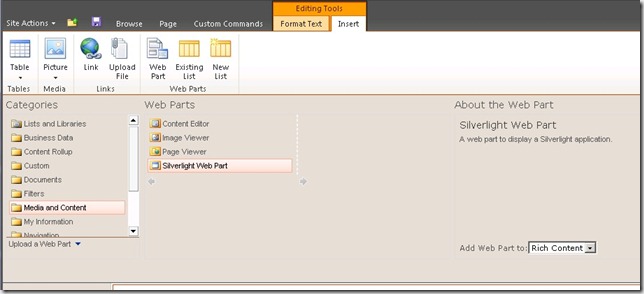
Silverlight Web Part

Next, we will create the Visual Studio 2010 solution.

4) Create a new Visual Studio project, selecting the Empty SharePoint Project template (Visual C# | SharePoint | 2010 | Empty SharePoint Project). Name your solution SharePointSolutionDeployment. This will also add an empty SharePoint project in the solution. Make sure you point to the site you just set up for debugging. In addition, you have the option of creating a Sandbox or Farm solution – in general you should create a Sandbox solution unless you find you really need to do otherwise.

5) Next, add a Silverlight Application project (Visual C# | Silverlight | Silverlight Application) to the solution.  I named mine Simple Silverlight Application.

6) Change the background colour of the layout grid in the MainPage.xaml file. Double click MainPage.xaml to open it in design mode. and change the background colour of the grid to slate gray (or what ever you like – this is just to make it obvious when it shows up in SharePoint).

Now we will add the Module to the SharePointSolutionDeployment project, which will deploy our Silverlight XAP file to SharePoint.

7) Right click the SharePointSolutionDeployment and select Add | New Item…then select Visual C# | SharePoint 2010 | 2010 | Module. Name it Simple Silverlight Application Module

8) In the Solution Explorer, right click the Sample.txt file, and select Delete (note that it is also automatically deleted from the Elements.xml file).

9) Click on the Simple Silverlight Application Module, and observe the Properties display, as shown below:
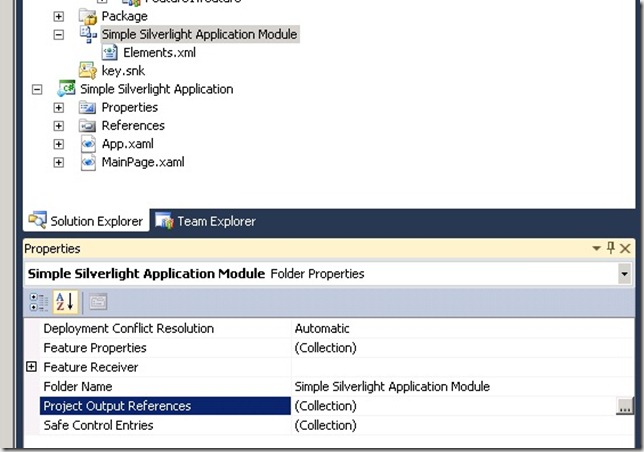
Module 1

10) Click on the ellipses to edit the Project Output References collection, and click Add:
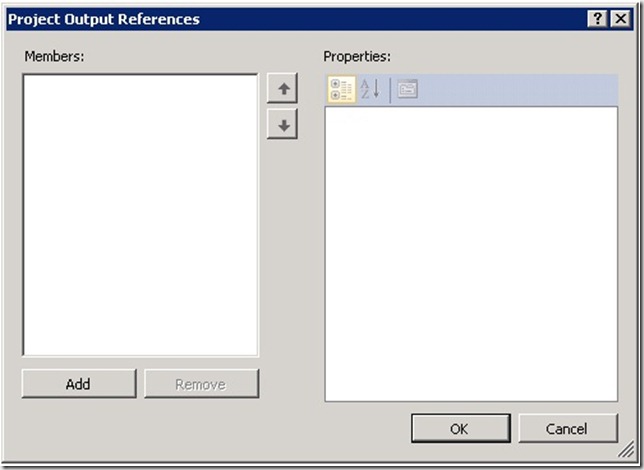
Module 2

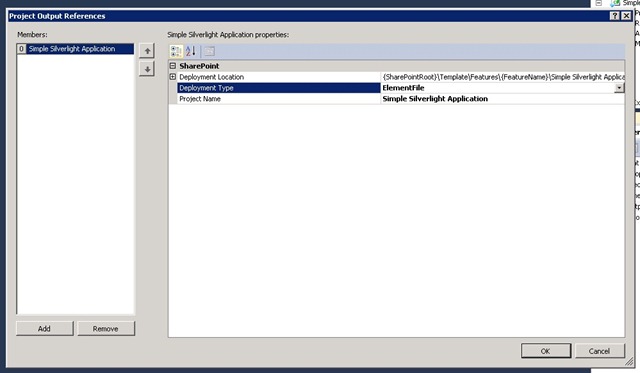
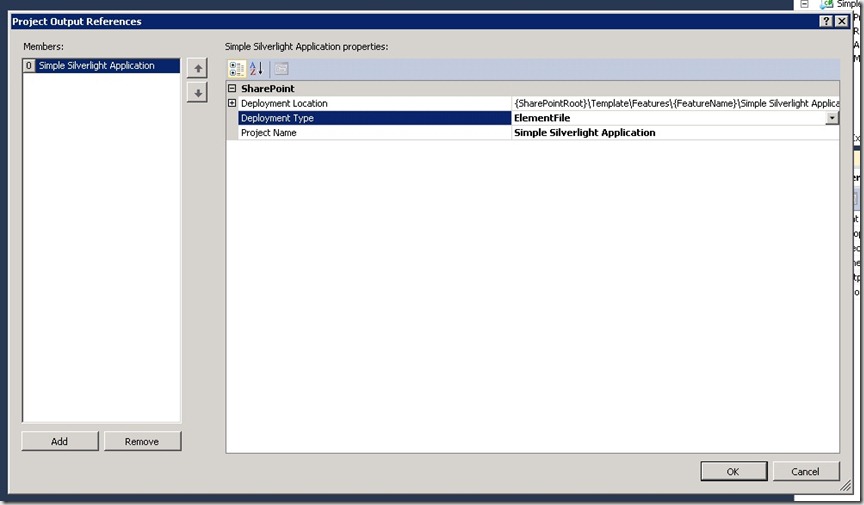
11) Click the dropdown next to Project Name, and select Simple Silverlight Application. Then change the Deployment Type to ElementFile, and click OK:
Module 3

12) Now, open the Elements.xml from your Simple Silverlight Application Module and make the following changes:

13) In the Module element, add the attribute Url=”name of your document library” (use the name of the document library you created in Step 3).

14) Add the following File element inside the Module element:

<File Path="Simple Silverlight Application Module\Simple Silverlight Application.xap"
      URL="Simple Silverlight Application.xap"
      Type="GhostableInLibrary" />

15) Your Element.xml file should now look like:

<?xml version=1.0" encoding="utf-8"?>
<Elements xmlns="http://schemas.microsoft.com/sharepoint/">
   <Module Name="Simple Silverlight Application Module" Url="Silverlight">
      <File Path="Simple Silverlight Application Module\Simple Silverlight Application.xap"
            URL="Simple Silverlight Application.xap"
            Type="GhostableInLibrary" />
   </Module>
</Elements>


16) You should now be able to build and deploy your solution (under the Build menu).

17) Once you have deployed the solution, check your SharePoint site to verify that the XAP file was deployed to the Silverlight library.

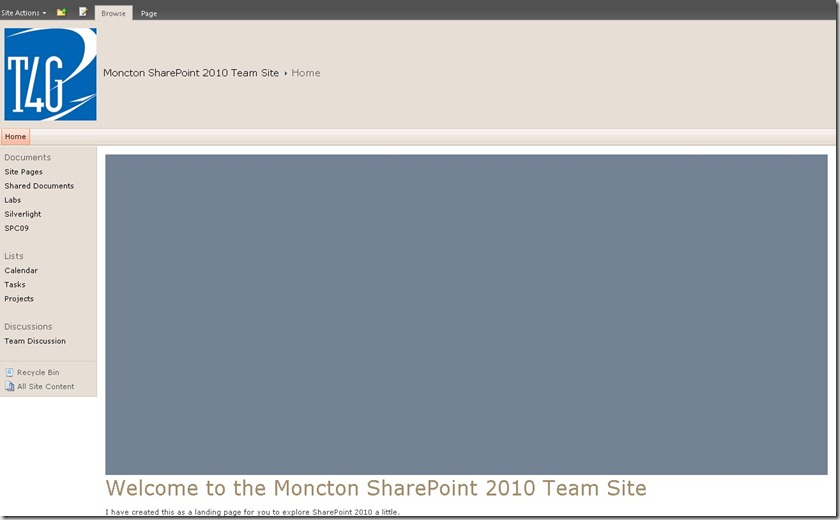
18) Go to your site home page (or the page where you created your Silverlight web part), and configure the Silverlight web part to point to your XAP file. After saving the settings and saving the page, your Silverlight web part should look something like below (note that the rectangle is slate gray, as we set in step 3):
Part 1 Complete

Part 2 – Using the Client Object Model in the Simple Silverlight Application

In this step, we will modify the Simple Silverlight Application to use the SharePoint 2010 Client Object Model to access information regarding the lists on the site.

19) In the Simple Silverlight Application, add references to Microsoft.SharePoint.Client.Silverlight and Microsoft.SharePoint.Client.Silverlight.Runtime. You will have to browse to find these in the Add Reference dialog. They are located at C:\Program Files\Common Files\Microsoft Shared\Web Server Extensions\14\TEMPLATE\LAYOUTS\ClientBin

20) Right-click App.xaml and select View Code.

21) Add the following using statements:

using Microsoft.SharePoint.Client;
using System.Threading;


22) Next add the following statement to the start of the Application_Startup method:

private void Application_Startup(object sender, StartupEventArgs e)
{
      ApplicationContext.Init(e.InitParams, SynchronizationContext.Current);
      this.RootVisual = new MainPage();
}


23) Now modify the MainPage.xaml design, adding a List Box and a Text Box as shown below. The List Box will be used to display a list of the lists on the site, and the Text Box will display some details regarding the list selected in the List Box.

<Grid x:Name="LayoutRoot" Background="SlateGray">
   <StackPanel Orientation="Horizontal" >
      <ListBox Name="lbLists" Width="300" Height="400" ScrollViewer.VerticalScrollBarVisibility="Auto" Margin="20,20,20,20" />
      <TextBox Name="txtDetails" Width="200" Height="400" TextWrapping="Wrap" />
   </StackPanel>
</Grid>

24) Right click MainPage.xaml and select View Code. the following using statement to MainPage.xaml.cs:

using Microsoft.SharePoint.Client;

25) Add two member variables as shown below:

private Microsoft.SharePoint.Client.Web _web;
private Microsoft.SharePoint.Client.List _list;

26) Add the following code to the MainPage constructor, below the InitializeComponent() call. Note the call to ExecuteQueryAsync – as this is Silverlight, the queries back tot he server need to be asynchronous.

ClientContext context = new ClientContext(ApplicationContext.Current.Url);

_web = context.Web;

context.Load(_web);
context.Load(_web.Lists);

context.ExecuteQueryAsync(new ClientRequestSucceededEventHandler(OnRequestSucceeded), new ClientRequestFailedEventHandler(OnRequestFailed));

27) Next, add the two callback routines from ExecuteQueryAsync, as shown below. In OnRequestSucceeded, the call to FillList is called on a separate thread. The OnRequestFailed method is just a stub.

private void OnRequestSucceeded(Object sender, ClientRequestSucceededEventArgs args)
{ // this is not called on the UI thread
      Dispatcher.BeginInvoke(FillList);
}

private void OnRequestFailed(Object sender, ClientRequestFailedEventArgs args)
{
}

28) Now, implement the FillList method:

private void FillList()
{
   lbLists.Items.Clear();
   lbLists.ItemsSource = _web.Lists;
   lbLists.DisplayMemberPath = "Title";
}

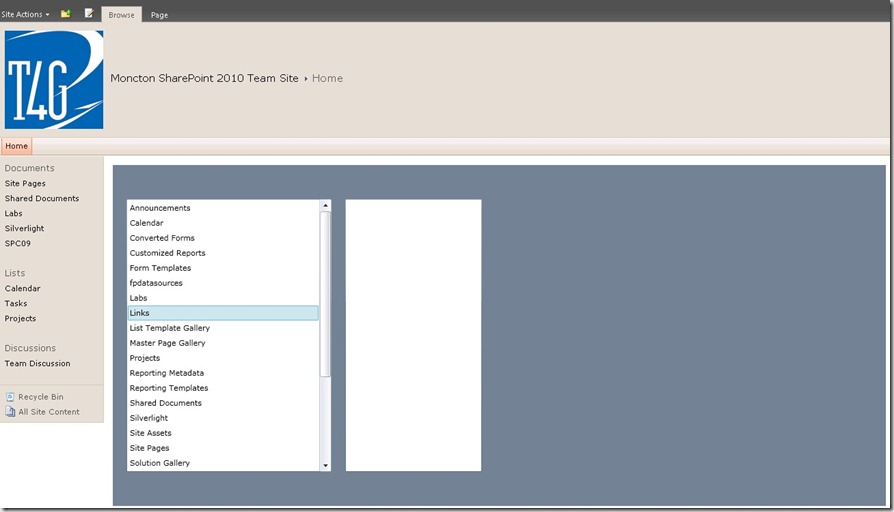
29) Build and deploy the solution. Refresh your page with the Silverlight web part. The List Box should now display a list of the Lists on your site, as shown below:
Lists

30) Next, we will add an event handler for the List Box selection changed, and to then retrieve the details for the selected list.

31) In the design view for MainPage.xaml, double click the list box to create a handler for the selection changed event. Add the following code to the event handler (again note the asynchronous call):

private void lbLists_SelectionChanged(object sender, SelectionChangedEventArgs e)
{
   using (ClientContext context = new ClientContext(ApplicationContext.Current.Url))
   {
      _list = context.Web.Lists.GetByTitle(((Microsoft.SharePoint.Client.List)lbLists.SelectedItem).Title);
      context.Load(_list);
      context.ExecuteQueryAsync(new ClientRequestSucceededEventHandler(OnListDetailsRequestSucceeded), null);
   }
}

32) Add the callback routine for the asynchronous query:

private void OnListDetailsRequestSucceeded(Object sender, ClientRequestSucceededEventArgs args)
{ // this is not called on the UI thread
   Dispatcher.BeginInvoke(ShowListDetails);
}

33) Finally, add the routine to display the list details in the Text Box:

private void ShowListDetails()
{
   string infoAboutList =
      string.Format("List Details:" + Environment.NewLine +
                         "Title: {0}" +
                         "Description: {1}" +
                         "Item Count: {2}" +
                         "Base Template: {3}" +
                         "Base Type: {4}" +
                         "Content Types Enabled?: {5}" +
                         "Hidden?: {6}",
                         _list.Title + Environment.NewLine,
                         _list.Description + Environment.NewLine,
                         _list.ItemCount + Environment.NewLine,
                         _list.BaseTemplate + Environment.NewLine,
                         _list.BaseType + Environment.NewLine,
                         _list.ContentTypesEnabled + Environment.NewLine,
                         _list.Hidden + Environment.NewLine);

   txtDetails.Text = infoAboutList;
}

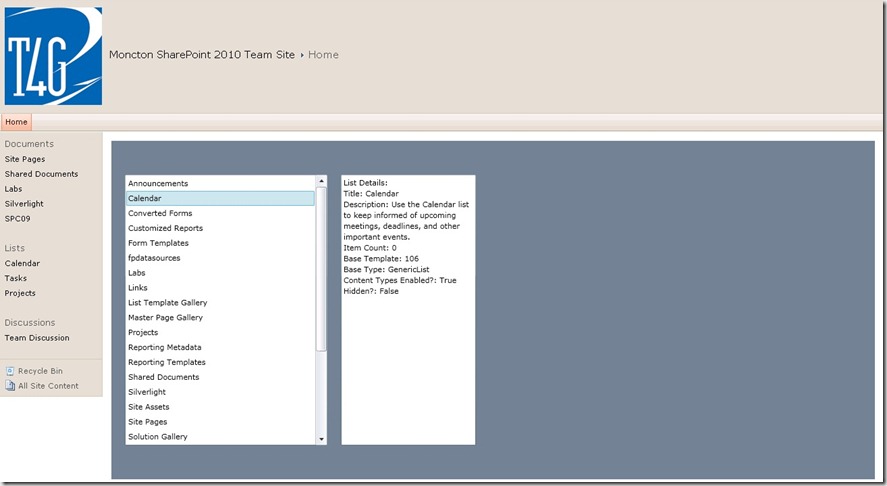
34) Build and deploy the solution. Refresh your page with the Silverlight web part. As before, the List Box should now display a list of the Lists on your site. Select one of the lists, and the details for the list should be displayed in the Text Box, as shown below:
List Details

This has been a very simple introduction to creating and deploying a Silverlight application into SharePoint 2010, and then using the SharePoint 2010 Client Object Model to access list information and display it in Silverlight. This could be extended to query more information on the Lists, or information on other collections on the site, such as Content Types, or Workflow Templates. The Silverlight UI could also obviously be enhanced as well.

The Wonder Of Apple’s Tablet – washingtonpost.com

The Wonder Of Apple’s Tablet – washingtonpost.com

Well, well, well….yet another “hype” article for the rumoured (though probably real in some form) Apple Tablet. I must admit, that I am of two minds on the the Apple Tablet (what ever it is will be called). On the one hand, I am very interested in seeing what Apple does with the idea. Will it be a real tablet, or will it just be a big iPhone? Will it run the iPhone OS or a real operating system?

I am mostly concerned simply because it comes from Apple. I personally find Apple to be one of the most troubling companies on the planet. Their closed systems and closed attitude towards the rest of the computing world bother me. Even worse are Apple fans. I dread to see the Apple Tablet merely on the grounds that 6 months later all of Apple fandom will be declaring loudly “how brilliant Steve Jobs is – he invented the Tablet!”.

Back to the article in the Washington Post. The author rightfully asks the question “Why would anyone want a tablet computer?” I personally love them. I have been using them for years (remember this for next Christmas kids – APPLE DID/WILL NOT INVENT THE TABLET PC). I have written several other posts about why I like them, and where I would like them to go in the future. Right now I have two Tablets – one is a slate model which I love. The other is the convertible Tablet given out to attendees at Microsoft PDC . This one has a great multi-touch interface running Windows 7. Its only weakness is pour handwriting support due to interference between touch capabilities and handwriting. In the house we also have two HP Touchsmart convertible tablets. These both support multi-touch and handwriting extremely well, and are well priced at just under $1000 (in Canada).

(Note here that MS already has a multitouch interface that supports gestures, handwriting, and runs a real OS, so is useful beyond just being another gadget.)

Now for the stupidest statement in the Washington Post article (possibly the stupidest tech statement made this year):

“The truth is that most of us don’t understand the allure of a tablet computer because they’ve all sucked up until now.”

Ok, the author just revealed himself to either be a moron, woefully uninformed, or just completely lacking in objectivity (perhaps stemming from the Crunchpad association). There are a number of very good tablets out there (and have been for a number of years). Any of the tablets from Motion Computing are great, though they are not consumer oriented (I have been using an LE1600 personally for 4+ years). The HP tablets have been consistently good. I have also heard great things about Toshiba, Fujitsu, and Dell tablets. The one complaint I have about all of them (except maybe the HP Touchsmart) is that the prices are way too high, but that is improving.

I will say I really want more out of a Tablet, as I said in a previous post. But that does not mean that all of the existing devices suck. Such a broad generalization, is well, just stupid.

Here is another statement from the article:

We’ll be living in a future with Minority Report, Star Trek, and Avatar interactive technology

it is interesting to note that the user interface in Minority Report was actually inspired by another non-Apple device – the Microsoft Surface.

The last quote I will take from this article is

Part of it is that Apple has a sterling record with consumer-oriented products.

Well, seems to me that Apple has failed a few more times than the author mentions. Seems the Mac Book Air didn’t do so well. Going back much further, anyone remember Steve Job’s Newton? Going back even further, Apple could be the dominant desktop OS right now if not for Job’s immeasurable ego back in the 80s (has that changed at all?).

My big concern here is how much of the consumer community reads and believes unsubstantiated drivel like this, and so dismisses anything non-Apple without even looking at it.   

A big part of the blame for this has to go to Microsoft, as well, and their atrocious marketing department. Tablet PCs have been around since 2002, and yet I still get stopped everywhere I travel by folks asking what my tablet is. How is that for getting the word out on one of your coolest technologies? It does not help that the press does not like to write about anything Microsoft because it is not “cool” to support MS.

So please folks, remember this – multi-touch, gesture-based computing is real and available today, and it is not from Apple. In addition, it runs an OS that lets you use everything you have been used to using, and does not lock you in to buying everything you ever want through Apple. And, you can even replace your own battery, unlike most Apple devices 🙂

PS – More hype for the “Apple saves the tablet” community is here. Also there is an older article Why Have Tablets Flopped? Here Are Five Reasons referenced. Of the five reasons quoted, only one is valid – price. Note also that the only pictures they use are of the Newton – the only real failure of the bunch. It is really sad that all of the media writing about tablets seems to have drunk the Apple Koolaid.