First look at SharePoint 2010 for Developers

The past week has seen quite a bit of new information being published by Microsoft regarding Office 2010 and SharePoint 2010. This is just the start, I am sure, and by the time Office 2010 is released next year, we will probably all be getting sick of hearing about it (jk). A good place to start getting a feel for SharePoint 2010 is to look at SharePoint 2010 Sneak Peek videos recently posted by Microsoft.

I had a look late last week at the new features from a general perspective – see my column over at Legal IT Professionals. In this post I want to have a look at some of the new features for developers. I will give my take on what I saw in the videos, and also mention a few things that I was hoping to see but didn’t.

The Developer Sneak Peek Video covers a number of features of SharePoint 201 for developers:

  • Visual Studio 2010 SharePoint tools
  • Language Integrated Query (LINQ) for SharePoint
  • Developer Dashboard
  • Business Connectivity Services
  • Client Object Model (OM)
  • Silverlight Web Part

The Visual Studio SharePoint tools are intended to improve programmer productivity when developing for SharePoint. A major new feature is the Visual Web Part Designer. As the name implies, this tool lets you visually design your web part UI, rather than coding it or using something like SmartPart. While the demonstration in the video is extremely simple, this tool should greatly improve the process of developing Web Parts for SharePoint 2010.

The support for Feature and Solution packaging seems to be greatly improved as well, and actually looks like it is a real Visual Studio tool rather than an afterthought.

Microsoft has also added a SharePoint node to the Server Explorer in Visual Studio. This allows you to look at the structure and content of the SharePoint site you are targeting without having to bounce back and forth between IE and Visual Studio.

Another big feature is the Business Connectivity Services design tools for Visual Studio. This is a set of tools for implementing BCS entities from within Visual Studio, allowing a developer to do more sophisticated BCS development than is possible from SharePoint Designer.

Moving beyond Visual Studio, there are a number of other important enhancements for developers.

One of these enhancements is the Developer Dashboard. This is a component which is enabled by a sight administrator, and can be added to any SharePoint page to support development and debugging. It provides diagnostic information regarding including the detailed page request, timing information, information on Stored procedures called, as well as details regarding resource usage, authenticated user, web part timings, etc. This should be a big help in troubleshooting issues.

Another addition is the addition of the Client Object Model, a client-side API for interacting with data on the SharePoint server using JavaScript, .NET code, or Silverlight.

Speaking of Silverlight, there is now a built-in Silverlight Web Part to facilitate deployment of rich UI components. The video shows a nice demonstration using Silverlight, the Silverlight Web Part, and the Client Object Model.  

While I definitely like what I see for developers in SharePoint 2010, there are a number of things I want to see but didn’t:

  1. The Visual Web Part Designer is great. I am curious, though, whether this tool will have any support for developing connectable web parts more easily? Creating the visual part of the Web Part is wonderful, but most useful web parts need to provide or consume connections.
  2. Another thought on the Web Part Designer – does it have support for developing async behaviours, or does it still have to be duck-taped together?
  3. Is there better support for development of Site Definitions, List Definitions, Content Types, etc.? This has remained a manual, tedious, and hence error-prone process. Similarly, is there support for editing of CAML for queries, etc.?
  4. SharePoint Workflow development support. The tools for workflow development in SharePoint 2007 are “ok” as far as they go, but there remain a fair number of very manual, very “cludgey” steps that make it non-trivial to implement real-world workflows, including the mechanisms for developing and using custom ASP.NET association, initiation, and task forms.
  5. Speaking of workflow, the execution environment for workflow in SharePoint is missing some pieces, most notably the tracking service. What has been added?
  6. Rumour has it that SharePoint 2010 will be running over .NET 3.5, not .NET 4.0. Say it ain’t so! So SharePoint Workflow will not take advantage of the performance improvements in .NET 4.0 – what’s the point?
  7. Does the Silverlight Web Part support connections? Or must any data flow into or out of the web part be done from within the Silverlight?

Well, those are my first thoughts on SharePoint 2010 for developers. I can’t wait to see/learn more over the coming months.

Apple plays softball with Palm – Fortune Brainstorm Tech

Apple plays softball with Palm – Fortune Brainstorm Tech

Once again, Apple demonstrates that it is the most proprietary, closed organization in the consumer marketplace. Again, is MS pulled something like this, there would be lawsuits and a DoJ investigation.

IE8 Slow Opening New Tab/Window

I have had a problem ofver the last few weeks with IE8 (running on the Windows 7 RC). Suddenly, any time I opened a new tab or new window (including initial startup, opening a blank tab, or openig a link in a new tab or window) became extremely slow. I am talking 10-30 seconds just to open a blank tab. It would sit there saying “Connecting”. What the heck is a blank tab connecting to for 30 seconds????

Finally, this morning, I got irritated enough to look for a solution.

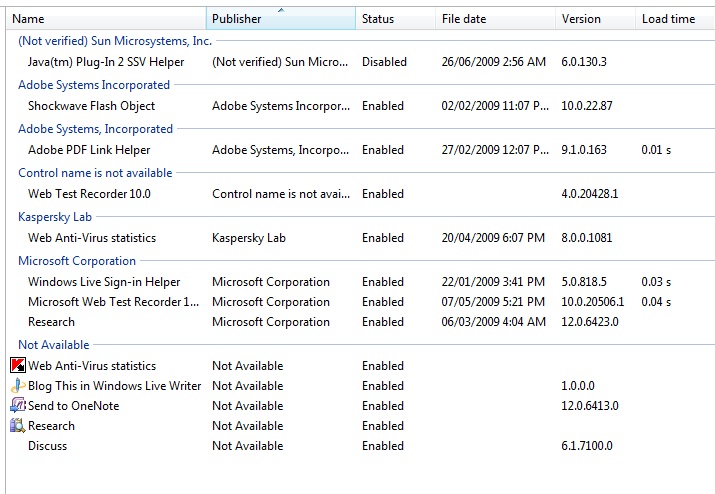
After a little digging on the web, I found several references to similar problems which seemed to be related to particular browser add-ons. Unfortunately, I do not have any of the add-ons from any of the discussions I found. It did seem to indicate an add-on could be the problem, however. So, I decided to just work through it the hard way – by trial and error. I opened the IE8 add-on manager (Tools | Manage Add-ons) and disabled all of the add-ons listed. I closed the dialog and created a new tab – and voila, opened in under a second. I then closed the browser and re-launched it. All of my tabs opened almost instantly.

So now I just had to figure out which of the add-ons was causing the problem. Fortunately, I do not have many add-ons:

Add-ons List
Add-ons List

As it turns out, as soon as I enabled the first one on the list (Java plugin helper), the slowness returned. Just for good measure, I went through and enabled each of the other add-ons individually, and none of the them caused any performance change.

So, now the Java plugin helper is disabled, all the others enabled, and all is good. When I get around to it, I will look and see if there is a fix for this plugin.

Makes me wonder, though, how something as fundamental as the Java plugin could be causing this problem, with no one screaming about it. Is it just me?

Consumerist – Applying For A Job? Great, Give Us Your Google And Facebook Passwords

Have a look at this…

Consumerist – Applying For A Job? Great, Give Us Your Google And Facebook Passwords – Facebook

This redneck town thinks it is ok to invade a person’s privacy if they want a job. By this same logic, it would be ok to tap the person’s phone, open their mail, peek through their windows…

While I can understand the need to perform background checks, this is completely inappropriate.

SketchFlow – Sketching and Prototyping in Expression Blend

I have just been reading SketchFlow – Sketching and Prototyping in Expression Blend. This looks really cool, and I can hardly wait to get a copy. It has been a long time since I saw a new tool that looks like it is made to use on my Tablet PC. There is also a good writeup on SketchFlow by Loren Heiny here.

Right now, I do design in OneNote – but of course there is no connection to any other tools used in the implementation of the design.

So, why can Apple get away with this?

As I have said before, Apple is the most anti-consumer organization in the high tech world…I mean, even if you can justify DRM on CONTENT, how can you possibly justify DRM on headphones? There is nothing going on here but greed, and a total lack of respect towards customers.

Apple Adds Still More DRM to iPod Shuffle

Google throws weight behind antitrust case against Microsoft – what a load of crap

Reading the article Google throws weight behind antitrust case against Microsoft – what a load of crap (not the article, the subject of the article).

I am so sick of companies whining on the one hand about how they cannot compete with “big bad Microsoft”, and yet claiming everything MS does is crap. If their products are crap, build something better and knock them off. MS products too complex? Too expensive? Then build something simpler and cheaper and be disruptive.

But to hear a large company with the market share Google has whine about Microsoft is comical to the point of silliness. Why should a company not be allowed to bundle its own browser with its platform? How many Linux distributions bundle Firefox? I could see there being a complaint if MS tried to stop you from installing running another browser, but they do not. And many people do. If you want to displace the pre-installed IE browser, build a better browser, market it well, and knock MS out of first place.

But don’t waste the taxpayer’s money by trying to get the courts and government to do your job for you!

Interesting stats

It is kind of funny to me that the most popular post I have written (based on the number of hits, anyway) is one on Vista from well over a year ago. It is even more interesting that the hit rate on this post has gone up over time.

Of course, it is fairly easy to draw hits – just use any combination of Microsoft, Vista, sucks, etc. in your tags!

Apple Marketing and Political Mud-slinging

I was wathing one of Apple’s “I’m a Mac, I’m a PC” commercials last night, and noticed how much Apple’s marketing campaign resembles the mindless mud-slinging which permeates the political campaign process. I cannot remember the last time any of these commercials actually mentioned anything good about the Mac, or even mentioned anything about the Mac’s capabilities.

I am sorry, but saying “you should buy my product because XYZ sucks” is a pretty lazy marketing campaign – especially from an organization that pretends to be innovative.